

Money
Income and Expenditure Account
Set opening cash balances, review live quarterly and annual figures, verify cash accounts, and close or reopen periods.
What this screen is for
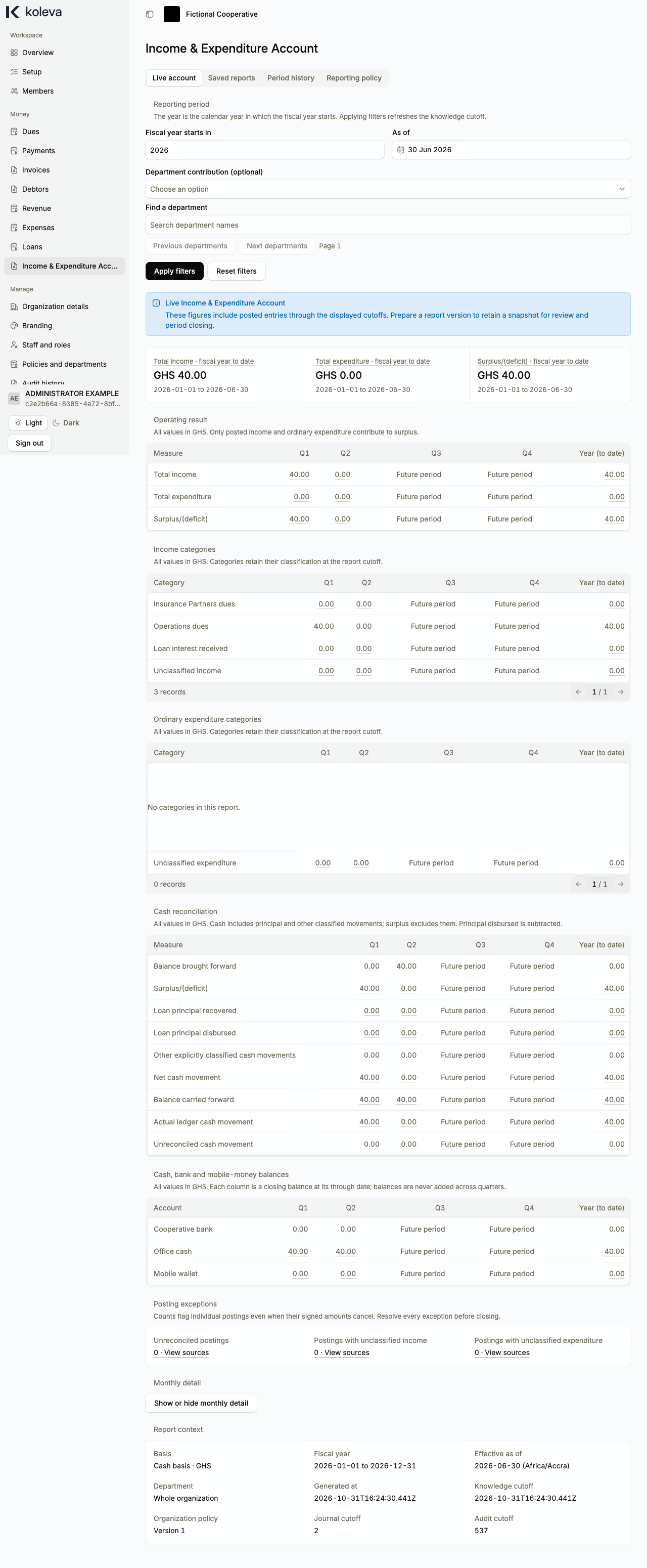
The Income & Expenditure Account screen shows your organization’s operating income, ordinary expenditure, surplus or deficit, and cash reconciliation across the four quarters and full fiscal year. You also use this screen to record opening balances, prepare official period reports, verify actual cash and bank balances with evidence, and close completed accounting periods.
Before you start
- You need an organization-wide Administrator or Accountant role with two-step verification enabled.
- Your organization policy, membership setup, and money accounts must be approved.
- To prepare saved period reports or close a period, propose and approve your Reporting policy on the Reporting policy tab first.
Step by step
- Select Income & Expenditure Account in the sidebar.
- If your organization held cash, bank, or mobile-money funds before starting on Koleva, open the Opening balances tab, enter the opening amount and date for each eligible account along with how you verified it, and submit it for Administrator approval.
- On the Live account tab, choose the Fiscal year starts in year, an As of date, and an optional department filter, then select Apply filters to inspect your quarterly (
Q1toQ4) and year-to-date income, expenditure, and cash balances. - Select any amount or View sources link to see the individual posted payments, expenses, or loan movements behind that figure.
- To prepare an official report for review and closing, open the Saved reports tab, choose the quarter or fiscal year, and start report preparation.
- Enter the actual external cash, bank, and mobile-money balances from your statements, upload supporting evidence (Portable Document Format (PDF) or image files) for every money account, and submit the cash verification.
- An Administrator reviews the report and cash evidence and approves it, which saves the official snapshot and closes the period against backdated entries.
Common questions
Why are loan disbursements and principal repayments not counted in Total income or Total expenditure?
Giving out loan principal and recovering loan principal are cash movements, not operating income or ordinary spending. Loan interest received counts toward Total income, while loan principal movements appear in the Cash reconciliation section so your opening and closing cash balances reconcile accurately.
What if we discover a missing entry after closing a quarter or year?
Open the Period history tab and submit a Reopen period request naming the earliest correction date and reason. Once an Administrator approves the reopening, you can post the correction, prepare fresh replacement reports for the affected periods, and close them in order from earliest to latest.